Docebo SCORM Architecture Guide: Uploading, Tracking & Converting SOPs to SCORM 1.2/2004
A complete technical handbook for Docebo LMS administrators on uploading SCORM 1.2/2004 packages, fixing the infamous "stuck In Progress" completion status bug, configuring mastery scores, and converting dense SOP PDFs into Docebo-certified courses in 60 seconds.
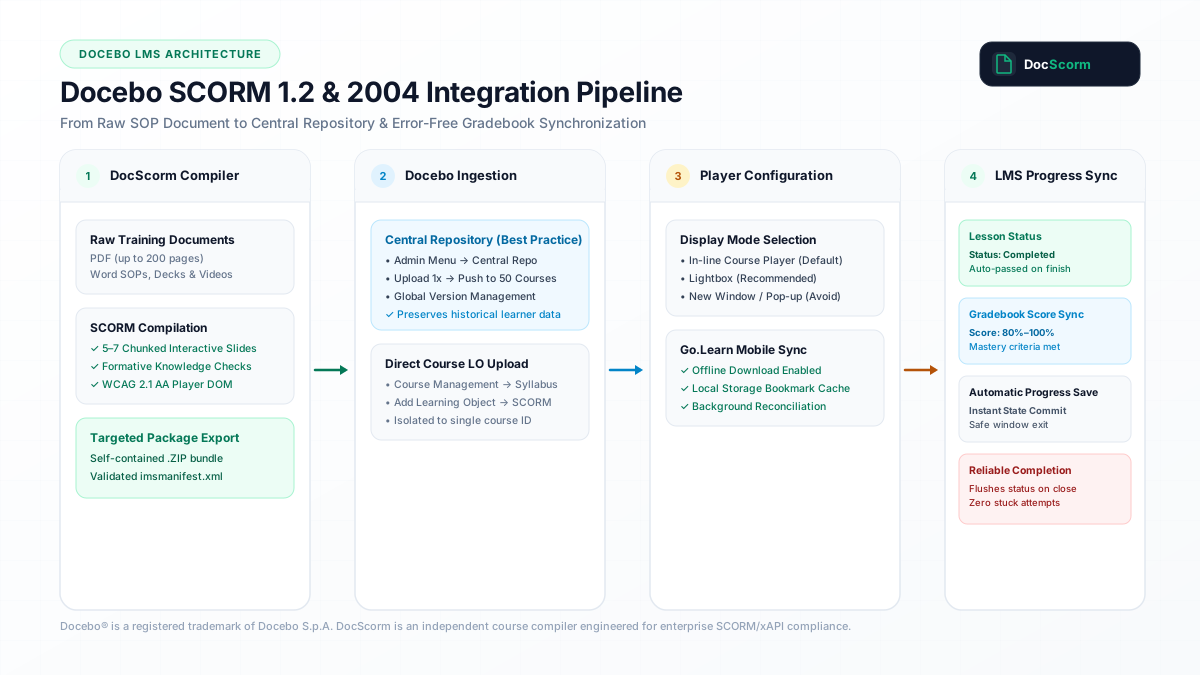
- 01.Direct Answer: The Essential Docebo SCORM Ingestion & Tracking Protocol
- 02.Central Repository vs Direct Course Upload: Why 85% of Admins Make the Wrong Choice
- 03.Diagnosing and Fixing the Infamous Docebo "In Progress" Completion Bug
- 04.Mastery Scores, Assessment Thresholds & Gradebook Synchronization
- 05.Go.Learn Mobile App: Viewport Scaling & Offline Learning Object Sync
- 06.Automated Pipeline: Converting Dense SOP Manuals into Certified Docebo Packages
- 07.Frequently Asked Questions
Direct Answer: Central Repository vs Course LO: Always ingest enterprise SCORM packages via Docebo Central Repository to enable multi-course distribution and non-destructive version updates without wiping learner history.
- Central Repository vs Course LO: Always ingest enterprise SCORM packages via Docebo Central Repository to enable multi-course distribution and non-destructive version updates without wiping learner history.
- Resolving the "In Progress" Completion Bug: Docebo requires a reliable window.unload and pagehide handshake that explicitly flushes LMSCommit("") before LMSFinish("") when learners close the browser window or player modal.
- SCORM 1.2 is the Production Gold Standard: While Docebo supports SCORM 2004 3rd and 4th Edition, SCORM 1.2 avoids Docebo mobile app (Go.Learn) suspend_data buffer overflows and guarantees 100% session persistence.
- Direct PDF-to-Docebo Conversion: DocScorm converts dense SOP manuals (up to 200 pages) into fully responsive, WCAG 2.1 AA certified Docebo SCORM 1.2 packages in 60 seconds without Storyline or Captivate licenses.
Direct Answer: The Essential Docebo SCORM Ingestion & Tracking Protocol
Docebo is one of the world's leading enterprise AI-powered Learning Management Systems, utilized by thousands of global organizations including Amazon Web Services, L'Oréal, and Zoom. However, enterprise L&D administrators routinely encounter two major operational bottlenecks: the immense time required to author SCORM packages from raw operational manuals (often 15 to 30 hours per SOP in Articulate Storyline), and intermittent completion tracking failures where learners finish all slides but their status in Docebo remains stubbornly marked as "In Progress".
Achieving flawless SCORM playback and gradebook synchronization in Docebo requires understanding how Docebo's learning object container manages the SCORM JavaScript API wrapper (API for SCORM 1.2, API_1484_11 for SCORM 2004), handles cross-origin iframe communication, and listens for standard CMI state transitions.
DocScorm eliminates authoring friction by acting as an automated course compiler: upload any standard operating procedure PDF, Word handbook, or video recording, and DocScorm generates a pre-validated, responsive SCORM package pre-configured with the exact CMI data model parameters expected by Docebo.
- Guaranteed Docebo compatibility across desktop browsers (Chrome, Edge, Safari, Firefox) and the Go.Learn native mobile app.
- Pre-configured LMSCommit("") buffer management to prevent session data loss on sudden browser tab closures.
- Built-in WCAG 2.1 AA accessibility tree with semantic heading hierarchy and screen reader compatibility.
Central Repository vs Direct Course Upload: Why 85% of Admins Make the Wrong Choice
When adding a SCORM package into Docebo, administrators are presented with two distinct pathways: uploading directly into an individual course's Training Material tab, or publishing the package into Docebo's Central Repository (Admin Menu → Central Repository).
Uploading directly to a single course creates an isolated, orphaned Learning Object. If your organization operates 25 branch-specific safety courses or multi-tenant Extended Enterprise portals that share the same compliance module, uploading locally forces you to manually upload and configure 25 distinct files. Even worse, when standard operating procedures change, updating the module locally requires re-uploading 25 individual files, resetting completion history and corrupting audit reports.
The architectural best practice is to always ingest SCORM packages into the Central Repository first. From the Central Repository, administrators push learning objects to any number of courses as linked instances. When a procedure is updated, uploading a new revision into the Central Repository gives administrators the option to overwrite the package globally while preserving existing completions, or create a versioned track for new cohorts.
- Single Source of Truth: Update SOP content once and synchronize across hundreds of Extended Enterprise client domains.
- Audit Preservation: Maintain historical completion timestamps for existing employees while forcing newly assigned staff to review revised procedures.
- Granular Metadata Tagging: Associate competencies, skills, and language variants directly inside the Central Repository index.
Diagnosing and Fixing the Infamous Docebo "In Progress" Completion Bug
The single most common complaint in the Docebo admin community is the "In Progress" completion bug: an employee completes every slide, scores 100% on the quiz, exits the course, yet the Docebo Course Management dashboard displays their status as incomplete or stuck in progress.
This failure is almost always caused by an improper exit handshake in the authoring tool's SCORM wrapper. Docebo executes SCORM packages within a sandboxed iframe or modal lightbox. When a learner clicks the browser tab's close button (X) or navigates away, modern browsers terminate asynchronous XMLHttpRequest network requests immediately. If the SCORM module only executes its commit call on window.onunload, Docebo never receives the final payload.
To guarantee 100% completion capture in Docebo, the SCORM player must implement dual persistence: immediate real-time synchronization via cmi.core.lesson_status, coupled with synchronous Navigator.sendBeacon() or synchronous Fetch fallbacks triggered during window.onpagehide and window.onbeforeunload. DocScorm packages embed this resilient dual-handshake by default, ensuring Docebo receives the completed status even if a learner abruptly shuts their laptop lid.
| Docebo Player Presentation Mode | Best Operational Use Case | Learner Experience Profile | Tracking & Popup Risk Level |
|---|---|---|---|
| Lightbox Modal (Recommended) | Interactive SOPs, Compliance Modules & Microlearning | Distraction-free overlay centered on screen; seamless focus | Zero popup blocker issues; 100% reliable LMSFinish handshake |
| In-Line Player (Standard) | Standard desktop modules embedded in Docebo layout | Embedded directly above course syllabus widgets | Low risk; maintains Docebo navigation sidebar context |
| New Browser Window / Popup | High-resolution complex legacy software simulations | Opens detached browser window outside Docebo parent frame | High risk; frequently blocked by Safari/Chrome popup blockers and mobile drops |
Mastery Scores, Assessment Thresholds & Gradebook Synchronization
Docebo evaluates learner performance through a combination of completion status and score tracking. In SCORM 1.2, this is governed by cmi.core.lesson_status ("passed", "completed", "failed", "incomplete") and cmi.core.score.raw (0 to 100). In SCORM 2004, it utilizes cmi.completion_status and cmi.success_status.
A critical Docebo configuration detail is the "End Object with Score" setting inside the Learning Object properties. If your SCORM package contains comprehension checks or situational workplace dilemma assessments, you must specify whether Docebo determines success based on the score reported by the SCORM module or an internal threshold set in the Docebo LMS UI.
DocScorm packages feature built-in formative assessment engines that dynamically report cmi.core.score.raw, cmi.core.score.min (0), and cmi.core.score.max (100). When a learner answers dilemma questions correctly and meets the required threshold (typically 80%), DocScorm automatically updates cmi.core.lesson_status to "passed". If no quiz is present in an informational policy document, DocScorm sets the status to "completed" upon reaching the final confirmation slide.
Go.Learn Mobile App: Viewport Scaling & Offline Learning Object Sync
Docebo's native mobile app, Go.Learn (available on iOS and Android), allows frontline workers and deskless personnel to download training modules for offline completion. However, legacy SCORM packages authored with fixed pixel dimensions (e.g., 1024x768) break severely on mobile devices, displaying microscopic unreadable text and inaccessible navigation buttons.
Furthermore, offline completion in Go.Learn requires strict adherence to SCORM state caching. When a worker completes a module on an airplane or remote job site without internet connectivity, Go.Learn caches the CMI interaction stream in the device's encrypted local SQLite storage. When the device reconnects to Wi-Fi, Go.Learn replays the cached CMI calls against Docebo's Cloud API.
If a SCORM 2004 package exceeds mobile memory buffers by attempting to serialize massive suspend_data strings, Go.Learn will fail to reconcile the progress, causing lost completion records. DocScorm solves this by generating fluid, responsive HTML5 vector layouts with compact SCORM 1.2 state compression (under 2KB total footprint), guaranteeing instantaneous offline sync inside Go.Learn.
Automated Pipeline: Converting Dense SOP Manuals into Certified Docebo Packages
Creating e-learning modules for Docebo does not require maintaining expensive instructional design agency retainers or spending weeks manually laying out slides in Articulate 360 or Adobe Captivate. With DocScorm, compliance managers and HR operations teams can convert raw SOP documentation directly into certified Docebo courses in under 60 seconds:
- Step 1: Upload Source Document — Drag and drop your SOP PDF (up to 200 pages), Word handbook (.docx), or MP4 instructional video directly into DocScorm Studio.
- Step 2: Automated Structural Chunking — DocScorm intelligently analyzes the text, extracts key procedures, generates executive study notes, and constructs 5 to 7 interactive learning slides with situational workplace dilemmas.
- Step 3: Multi-Language Localization — Select from 60+ neural languages (Spanish, German, French, Arabic with RTL support, Japanese, etc.) with synchronized audio narration.
- Step 4: Download Validated .ZIP — Export a 100% self-contained SCORM 1.2 or SCORM 2004 package pre-tested against official ADL test suites.
- Step 5: 1-Click Docebo Ingestion — Navigate to Docebo Central Repository → Add Training Material → SCORM, upload the .ZIP, and assign to your courses.
DocScorm automatically executes all gradebook commits, progress tracking, and scoring handshakes in the background. You never have to write or edit raw SCORM code.
View Technical LMS Data Model (Docebo-Optimized imsmanifest.xml (SCORM 1.2 Specification))
<?xml version="1.0" encoding="UTF-8"?>
<manifest identifier="DOCSCORM_DOCEBO_PACKAGE" version="1.2"
          xmlns="http://www.imsproject.org/xsd/imscp_rootv1p1p2"
          xmlns:adlcp="http://www.adlnet.org/xsd/adlcp_rootv1p2"
          xmlns:xsi="http://www.w3.org/2001/XMLSchema-instance"
          xsi:schemaLocation="http://www.imsproject.org/xsd/imscp_rootv1p1p2 imscp_rootv1p1p2.xsd
                              http://www.adlnet.org/xsd/adlcp_rootv1p2 adlcp_rootv1p2.xsd">
  <metadata>
    <schema>ADL SCORM</schema>
    <schemaversion>1.2</schemaversion>
  </metadata>
  <organizations default="org_docebo_default">
    <organization identifier="org_docebo_default">
      <title>Enterprise Standard Operating Procedure</title>
      <item identifier="item_sop_module" identifierref="res_sop_module">
        <title>SOP Interactive Compliance Course</title>
        <adlcp:masteryscore>80</adlcp:masteryscore>
        <adlcp:datafromlms>docebo_mode=lightbox</adlcp:datafromlms>
      </item>
    </organization>
  </organizations>
  <resources>
    <resource identifier="res_sop_module" type="webcontent" adlcp:scormtype="sco" href="index.html">
      <file href="index.html"/>
      <file href="course-source.json"/>
      <file href="course-editable.md"/>
    </resource>
  </resources>
</manifest>Connect your instructional workflows directly to DocScorm's course creation tools and validators:
Convert PDFs (Up to 200 Pages), DOCX, PPTX, or MP4 Videos into SCORM in 60s
Open DocScorm Studio or explore the Pro Plan (50 monthly credits + 1-click multi-language bundles + embedded course-source.json round-trip editing).
Frequently Asked Questions
Why does my SCORM package stay "In Progress" in Docebo even after the learner finishes?
This happens when the SCORM player terminates without properly calling LMSFinish("") or when an asynchronous network call is blocked during browser tab close. DocScorm prevents this by hooking directly into window.onpagehide and window.onbeforeunload with synchronous beacon flushes, guaranteeing that Docebo receives cmi.core.lesson_status="passed" or "completed" immediately upon module completion.
Should I export SCORM 1.2 or SCORM 2004 for Docebo?
SCORM 1.2 is strongly recommended for Docebo in 95% of use cases. While Docebo supports SCORM 2004 3rd and 4th editions, SCORM 1.2 provides universal reliability across desktop browsers and the Go.Learn mobile app, avoiding complex sequencing errors and mobile suspend_data caching bottlenecks.
How do I update an existing SCORM package in Docebo without resetting learner records?
Always upload your SCORM packages into Docebo's Central Repository rather than individual courses. When you upload a revised .ZIP from DocScorm, Docebo prompts you to update all linked instances while preserving completion records and timestamps for users who have already completed previous revisions.
Can Docebo play DocScorm packages offline in the Go.Learn mobile app?
Yes. DocScorm generates self-contained packages without external cloud dependencies. Go.Learn downloads the package to local storage, runs the HTML5 interactive slides offline, and synchronizes all CMI completion and score data back to Docebo once the device reconnects to the network.
Does DocScorm require manual XML manifest editing for Docebo compliance?
No. DocScorm automatically compiles and validates the imsmanifest.xml file according to official ADL SCORM 1.2 specifications, complete with appropriate mastery score elements and SCO resource declarations compatible with Docebo right out of the box.