The US Higher Ed & K-12 Playbook: Converting Syllabi, Lecture Slides & Reading Packets into Canvas & Blackboard SCORM Modules
How faculty and instructional design teams at Harvard, MIT, Stanford, NYU, and major school districts convert static PDFs and slide decks into ADA Title II & Section 508 compliant SCORM 1.2/2004 packages with Canvas SpeedGrader sync.
- 01.The Higher Ed Dilemma: Why Static PDFs Fail in Canvas & Blackboard
- 02.Step-by-Step: Converting a 60-Page Course Reader into a 6-Slide SCORM Module
- 03.ADA Title II & Section 508 Compliance: The 2026 Department of Justice Mandate
- 04.Technical SCORM Telemetry: Configuring Canvas SpeedGrader & Blackboard Passback
- 05.Case Study: STEM Lab Safety & Clinical Protocol Inductions
- 06.Frequently Asked Questions
Direct Answer: Dense academic PDFs (up to 200 pages) can be automatically chunked into 5-7 bite-sized SCORM slides with formative comprehension checks.
- Dense academic PDFs (up to 200 pages) can be automatically chunked into 5-7 bite-sized SCORM slides with formative comprehension checks.
- Gradebook sync is powered by standard cmi.core.score.raw and cmi.core.lesson_status parameters recognized by Canvas LMS and Blackboard Learn Ultra.
- Guaranteed compliance with Department of Justice 2026 ADA Title II digital accessibility rules (WCAG 2.1 AA screen reader DOM, keyboard navigation, 4.5:1 contrast).
- FERPA-compliant zero-retention data isolation protects unpublished academic research and student privacy.
The Higher Ed Dilemma: Why Static PDFs Fail in Canvas & Blackboard
Across universities like Harvard, Stanford, NYU, and large urban school districts like Chicago Public Schools and LAUSD, thousands of hours of academic instruction are trapped in static PDF course readers and 100-slide PowerPoint presentations. When uploaded directly to Canvas LMS or Blackboard Learn as raw downloads, professors have zero visibility into whether students have actually read the material, understood key theories, or engaged with mandatory lab safety protocols.
Traditional e-learning authoring tools like Articulate Storyline and Adobe Captivate require between 20 to 40 hours of manual layout, trigger mapping, and SCORM manifest editing per module. For academic departments with hundreds of rotating adjuncts, specialized lecturers, and tight semester deadlines, manual authoring is an insurmountable operational bottleneck.
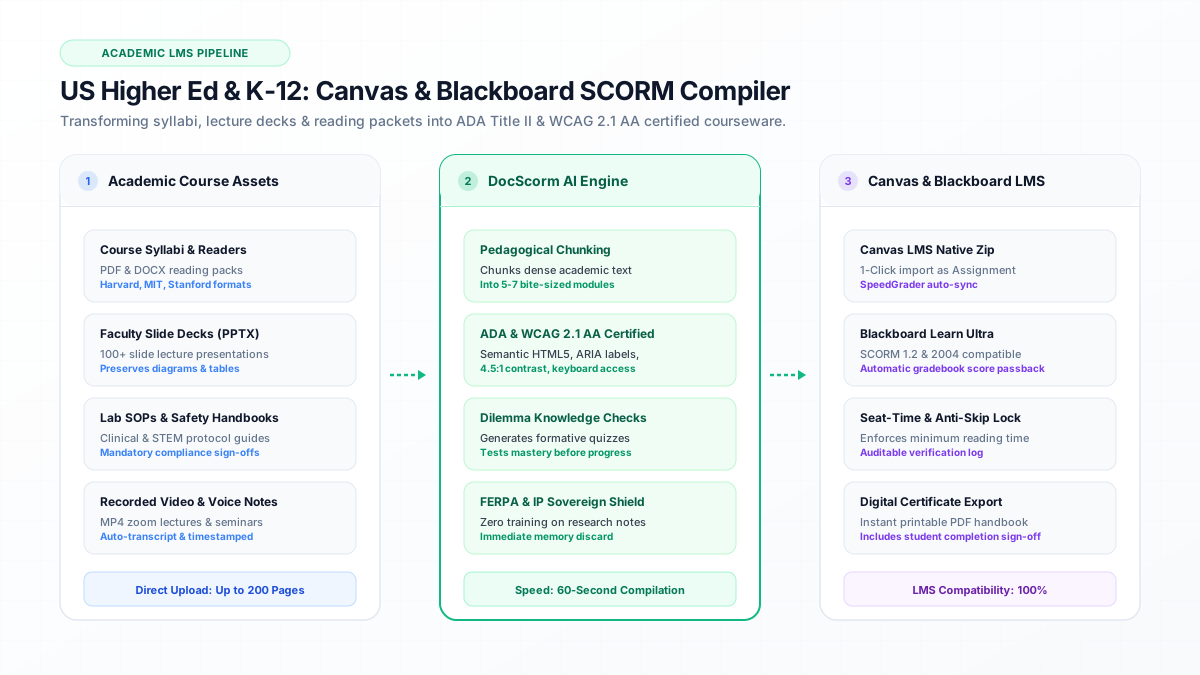
DocScorm solves this by acting as an automated course compiler: professors upload their existing syllabus PDF, PowerPoint slide deck, or reading packet, and within 60 seconds receive a certified, interactive SCORM 1.2 or SCORM 2004 ZIP package ready for 1-click import into Canvas or Blackboard.
- No authoring tool licenses required ($1,399/year per seat saved across faculty).
- Eliminates student file downloads by embedding trackable interactive viewers directly in Canvas.
- Generates verifiable completion timestamps for accreditation and Title IX compliance.
Step-by-Step: Converting a 60-Page Course Reader into a 6-Slide SCORM Module
DocScorm applies cognitive load theory to divide dense academic papers and technical manuals into digestible instructional milestones. Rather than presenting a wall of unstructured text, the compiler identifies primary learning objectives, key definitions, and procedural instructions, restructuring them into a 5-to-7 slide progressive sequence.
Each slide contains clear visual hierarchy, bulleted key takeaways, and an integrated audio narration script for auditory learners. After students complete the core concepts, DocScorm dynamically generates Dilemma Scenarios—formative multiple-choice questions grounded in real-world application rather than rote memorization.
ADA Title II & Section 508 Compliance: The 2026 Department of Justice Mandate
Under the United States Department of Justice 2026 final rule under Title II of the Americans with Disabilities Act (ADA), public colleges, state universities, and K-12 school districts are legally mandated to ensure all digital coursework meets WCAG 2.1 Level AA accessibility standards. Unstructured PDFs frequently fail these audits due to missing tagging, improper reading orders, and untagged images.
DocScorm compiles course content into pristine semantic HTML5 with native ARIA landmark attributes, programmatic keyboard focus traps (Tab and Shift+Tab navigation), high-contrast visual tokens exceeding 4.5:1 ratio, and full compatibility with JAWS, NVDA, and VoiceOver screen readers.
| Accessibility Metric | Raw PDF Course Reader | DocScorm Compiled SCORM Package |
|---|---|---|
| Screen Reader Tagging | Inconsistent / Fragmented | 100% Semantic HTML5 (h1-h6, p, ul) |
| Keyboard Only Navigation | Difficult / Dependent on PDF reader | Full TAB focus cycle with active outlines |
| Color Contrast Ratio | Unchecked (often < 3:1) | Automated Slate/Emerald tokens (>= 4.5:1) |
| Mobile Responsiveness | Pinch-to-zoom horizontal scroll | Fluid viewport scaling across all screen sizes |
| Audit Attestation Log | None | Downloadable WCAG 2.1 AA compliance certificate |
Technical SCORM Telemetry: Configuring Canvas SpeedGrader & Blackboard Passback
When an instructor uploads a DocScorm ZIP file to Canvas, the course player initiates an immediate CMI handshake via window.API (SCORM 1.2) or window.API_1484_11 (SCORM 2004). As the student reads each module, the package updates cmi.core.lesson_location and cmi.core.session_time.
Upon completing the embedded knowledge check, DocScorm sends the normalized grade via cmi.core.score.raw (e.g. 100 for perfect completion) and triggers LMSCommit. Canvas LMS instantly registers the submission inside SpeedGrader, allowing teaching assistants and professors to review completion status without manually grading reading quizzes.
DocScorm automatically executes all gradebook commits, progress tracking, and scoring handshakes in the background. You never have to write or edit raw SCORM code.
View Technical LMS Data Model (JavaScript: SCORM 1.2 Handshake & Canvas LMS Gradebook Passback)
// Initialize SCORM session in Canvas LMS iframe
var lms = window.API || (window.parent && window.parent.API);
if (lms) {
  lms.LMSInitialize("");

  // Track learner progress and enforce mandatory seat time
  lms.LMSSetValue("cmi.core.lesson_location", "module_3_ethics");
  lms.LMSSetValue("cmi.core.session_time", "00:14:32");

  // Send student quiz result directly to Canvas SpeedGrader
  lms.LMSSetValue("cmi.core.score.raw", "95");
  lms.LMSSetValue("cmi.core.score.min", "0");
  lms.LMSSetValue("cmi.core.score.max", "100");
  lms.LMSSetValue("cmi.core.lesson_status", "passed");

  // Persist telemetry to LMS database
  lms.LMSCommit("");
}Case Study: STEM Lab Safety & Clinical Protocol Inductions
At leading research facilities, graduate researchers and undergraduate chemistry students must complete laboratory safety inductions before receiving keycard access to cleanrooms and biosafety level 2 (BSL-2) environments. Previously, safety manuals were distributed as 80-page spiral-bound booklets with manual paper sign-offs.
By compiling the safety manual through DocScorm, the department created an online course with anti-skip timers that required at least 30 minutes of seat time and a 100% passing score on chemical spill protocols. Upon completion, students receive a signed digital completion certificate with a unique SHA-256 validation hash, completely eliminating audit liability for environmental health and safety (EHS) officers.
Connect your instructional workflows directly to DocScorm's course creation tools and validators:
Convert PDFs (Up to 200 Pages), DOCX, PPTX, or MP4 Videos into SCORM in 60s
Open DocScorm Studio or explore the Pro Plan (50 monthly credits + 1-click multi-language bundles + embedded course-source.json round-trip editing).
Frequently Asked Questions
Can DocScorm handle 100+ slide PowerPoint lecture presentations?
Yes. DocScorm easily processes large multi-megabyte PPTX decks and PDF documents up to 200 pages. It extracts text, tables, and slide headings while synthesizing concise summary slides and assessment questions.
How does the SCORM score appear in the Canvas LMS Gradebook?
When uploaded as a Graded Assignment in Canvas, Canvas maps the SCORM cmi.core.score.raw value directly into the corresponding gradebook column. Once a student reaches the required passing score, Canvas marks the assignment as Submitted and Complete in SpeedGrader.
Are course readings compliant with screen readers like JAWS and NVDA?
Yes. All DocScorm modules are compiled into semantic, accessible HTML5 structures with strict ARIA roles, descriptive alt tags, and logical heading hierarchies that comply with WCAG 2.1 Level AA and Section 508 standards.