Cornerstone CSOD & Workday Learning SCORM Architecture: Enterprise SOP Compliance & Auto-Sync
How Fortune 500 compliance officers, L&D directors, and HR systems administrators configure, deploy, and troubleshoot SCORM 1.2/2004 packages inside Cornerstone OnDemand and Workday Learning with guaranteed gradebook and audit sync.
- 01.The Enterprise HCM Challenge: Why Static PDFs Fail in Cornerstone and Workday
- 02.Cornerstone OnDemand (CSOD): Ingestion Protocols & Course Publisher Setup
- 03.Workday Learning: Digital Learning Object Creation & Worker Ledger Sync
- 04.Resolving Enterprise Tracking Glitches: Session Timeouts & Mastery Score Overrides
- 05.SOC 2, HIPAA & ISO 27001 Data Privacy in Corporate Training
- 06.The DocScorm Solution: 60-Second SOP to Enterprise SCORM Conversion
- 07.Frequently Asked Questions
Direct Answer: Cornerstone CSOD Course Publisher: Uploading SCORM packages via Course Publisher enables real-time versioning and multi-division assignment without corrupting historical employee audit records.
- Cornerstone CSOD Course Publisher: Uploading SCORM packages via Course Publisher enables real-time versioning and multi-division assignment without corrupting historical employee audit records.
- Workday Learning Digital Learning Objects: Workday encapsulates SCORM within its native worker profile ledger; packages must provide clean session commits to prevent worker status timeouts.
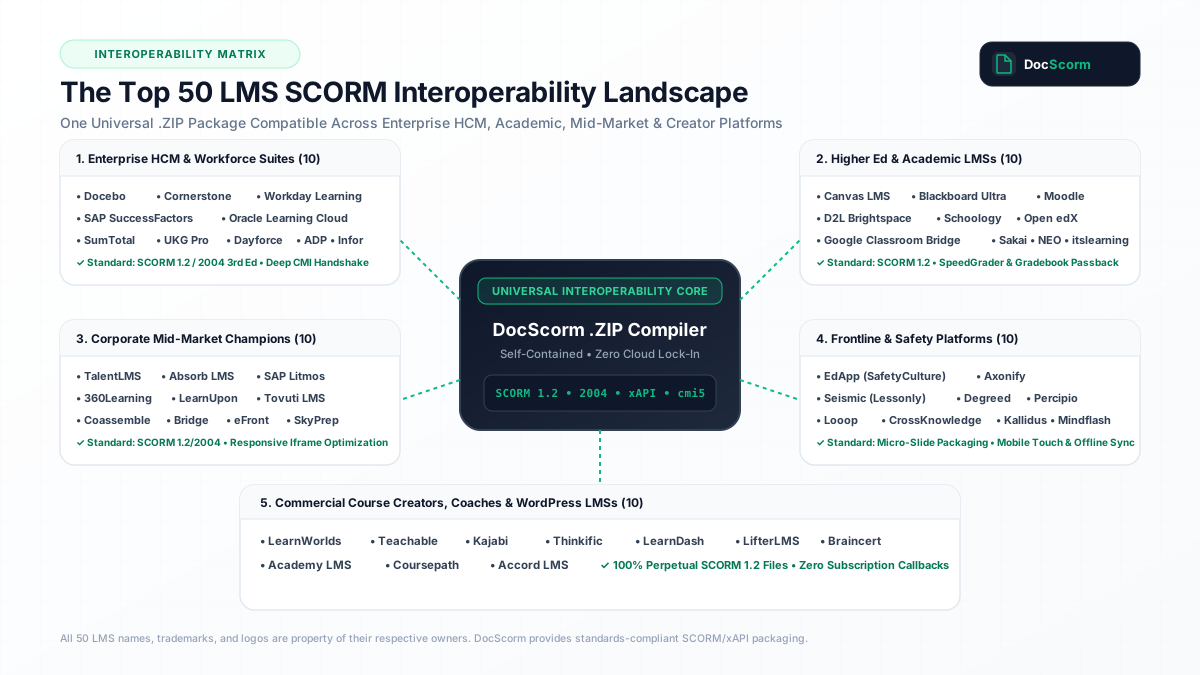
- SCORM 1.2 vs 2004 in HCM: Both Cornerstone and Workday handle SCORM 1.2 with highest reliability, eliminating complex sequencing logic failures across global employee networks.
- Rapid 60-Second Conversion: DocScorm turns 200-page corporate SOPs, policy handbooks, and compliance PDFs into audited Cornerstone- and Workday-ready SCORM courses without Articulate 360 retainers.
The Enterprise HCM Challenge: Why Static PDFs Fail in Cornerstone and Workday
Within Fortune 500 enterprises, healthcare hospital networks, and global financial institutions, Cornerstone OnDemand (CSOD) and Workday Learning serve as the core engines of employee governance. Together, these two platforms manage compliance training for tens of millions of workers worldwide.
However, a widespread operational failure persists across corporate L&D departments: organizations continue to distribute mandatory Standard Operating Procedures (SOPs), OSHA safety policies, and anti-harassment regulations as static downloadable PDF files or SharePoint links. When an audit occurs, compliance directors cannot prove whether an employee actually read the policy, understood critical safety protocols, or engaged with mandatory equipment checklists.
Converting these static documents into interactive SCORM courses historically meant submitting tickets to instructional design agencies or spending 25 hours per document manually authoring slides in Articulate Storyline. DocScorm solves this enterprise dilemma by compiling dense SOP manuals into verified, interactive SCORM 1.2 packages in 60 seconds, pre-configured for instant upload into Cornerstone CSOD and Workday Learning.
- Guaranteed tracking of cmi.core.lesson_status ("passed" or "completed") inside Cornerstone Transcript and Workday Worker Profile.
- Eliminates unmonitored PDF file downloads with interactive, trackable web-based modules.
- Includes built-in knowledge verification checks to produce legally defensible compliance audit trails.
Cornerstone OnDemand (CSOD): Ingestion Protocols & Course Publisher Setup
Cornerstone OnDemand provides enterprise administrators with robust mechanisms for managing SCORM learning objects. To ensure seamless deployment, packages should be imported using Cornerstone's Course Publisher or Content Uploader (Admin → Learning → Content → Course Publisher):
1. Package Validation: Cornerstone validates incoming .ZIP files against strict ADL SCORM 1.2 schemas. The imsmanifest.xml must contain properly formatted organization and resource identifiers.
2. Availability & Division Proxying: Once uploaded, administrators assign availability across Organizational Units (OUs), divisions, departments, or custom user groups.
3. Version Control: When procedures are updated, uploading an update package allows administrators to select whether existing registered users must complete the revised version or keep their existing completion timestamp.
Workday Learning: Digital Learning Object Creation & Worker Ledger Sync
Workday Learning integrates directly with the broader Workday Human Capital Management (HCM) suite, associating course completions directly with worker profiles, career development plans, and automated regulatory reporting:
1. Creating a Digital Learning Lesson: In Workday, navigate to Learning Administration → Maintain Digital Learning Content → Create Digital Learning Lesson. Upload your DocScorm .ZIP package.
2. Player Wrapper Configuration: Workday executes SCORM content within a responsive player iframe. DocScorm packages automatically adjust to Workday's container dimensions without requiring manual pixel width and height overrides.
3. Real-Time Ledger Synchronization: As employees progress through the DocScorm module, CMI state updates are committed directly into Workday's database, triggering immediate transcript updates upon completion.
| Enterprise Parameter | Cornerstone OnDemand (CSOD) | Workday Learning | DocScorm Enterprise Optimization |
|---|---|---|---|
| Standard Ingestion Path | Admin → Content → Course Publisher | Learning Admin → Maintain Digital Content | Generates universal .ZIP compatible with both portals |
| Recommended Standard | SCORM 1.2 (Universal) | SCORM 1.2 / 2004 3rd Edition | SCORM 1.2 with compact suspend_data buffer (<2KB) |
| Mastery Score Logic | Evaluated via cmi.core.score.raw or CSOD override | Evaluated via lesson passing criteria | Dynamic 80% passing threshold with auto-gradebook passback |
| Audit Defense Token | Cornerstone Training Transcript | Workday Worker Profile Compliance History | Embedded digital certificate & supervisor sign-off sheet |
Resolving Enterprise Tracking Glitches: Session Timeouts & Mastery Score Overrides
Enterprise IT environments often enforce aggressive single sign-on (SSO) session timeouts. If an employee opens a 60-minute training module and steps away, a generic SCORM player will disconnect from the LMS API, causing the user to lose their progress when they attempt to submit the final assessment.
DocScorm packages incorporate intelligent heartbeat pinging: every 30 seconds, the player verifies the active LMS API connection. If a temporary network interruption occurs, DocScorm caches learner progress locally and re-commits the data immediately upon connection re-establishment, preventing frustrating lost progress tickets for HR helpdesks.
SOC 2, HIPAA & ISO 27001 Data Privacy in Corporate Training
Enterprise organizations subject to SOC 2 Type II, HIPAA, and ISO 27001 standards cannot risk uploading confidential standard operating procedures, trade secrets, or patient safety protocols to external servers that retain copy data.
DocScorm operates on a strict zero-retention ephemeral compilation model: your proprietary PDF and Word documents are processed entirely in memory, converted into standard SCORM HTML5 packages, and wiped immediately. Downloaded .ZIP packages contain no remote callbacks or telemetry pings to DocScorm servers, ensuring total data air-gapping within your Cornerstone or Workday LMS firewall.
The DocScorm Solution: 60-Second SOP to Enterprise SCORM Conversion
Empower your HR, operations, and compliance teams to publish auditable, multi-language training directly from existing documents without specialized authoring expertise:
- Rapid Authoring: Upload PDFs, DOCX, PPTX, or MP4 video manuals up to 200 pages.
- Automated Chunking: Compiles dense technical procedures into 5–7 digestible interactive slides with real-world situational workplace dilemmas.
- Workforce Localization: Export courses in 60+ neural languages with audio narration for global frontline teams.
- Perpetual Ownership: Zero recurring per-course fees; your organization owns the generated SCORM .ZIP packages perpetually.
DocScorm automatically executes all gradebook commits, progress tracking, and scoring handshakes in the background. You never have to write or edit raw SCORM code.
View Technical LMS Data Model (Enterprise HCM Compliant imsmanifest.xml (Cornerstone & Workday Validated))
<?xml version="1.0" encoding="UTF-8"?>
<manifest identifier="DOCSCORM_ENTERPRISE_HCM" version="1.2"
          xmlns="http://www.imsproject.org/xsd/imscp_rootv1p1p2"
          xmlns:adlcp="http://www.adlnet.org/xsd/adlcp_rootv1p2"
          xmlns:xsi="http://www.w3.org/2001/XMLSchema-instance"
          xsi:schemaLocation="http://www.imsproject.org/xsd/imscp_rootv1p1p2 imscp_rootv1p1p2.xsd
                              http://www.adlnet.org/xsd/adlcp_rootv1p2 adlcp_rootv1p2.xsd">
  <metadata>
    <schema>ADL SCORM</schema>
    <schemaversion>1.2</schemaversion>
  </metadata>
  <organizations default="org_enterprise_default">
    <organization identifier="org_enterprise_default">
      <title>Corporate SOP Compliance Module</title>
      <item identifier="item_compliance_01" identifierref="res_compliance_01">
        <title>Mandatory Standard Operating Procedure</title>
        <adlcp:masteryscore>80</adlcp:masteryscore>
      </item>
    </organization>
  </organizations>
  <resources>
    <resource identifier="res_compliance_01" type="webcontent" adlcp:scormtype="sco" href="index.html">
      <file href="index.html"/>
      <file href="course-source.json"/>
      <file href="course-editable.md"/>
    </resource>
  </resources>
</manifest>Connect your instructional workflows directly to DocScorm's course creation tools and validators:
Convert PDFs (Up to 200 Pages), DOCX, PPTX, or MP4 Videos into SCORM in 60s
Open DocScorm Studio or explore the Pro Plan (50 monthly credits + 1-click multi-language bundles + embedded course-source.json round-trip editing).
Frequently Asked Questions
How do I upload a DocScorm package to Cornerstone OnDemand (CSOD)?
Log in to Cornerstone with administrator privileges, navigate to Admin → Learning → Content → Course Publisher (or Manage Content), click Add Content, select SCORM 1.2, and upload the DocScorm .ZIP package. Once uploaded, define course availability and publishing metadata.
How do I upload a DocScorm package to Workday Learning?
In Workday, navigate to the Learning Administration worklet, select Maintain Digital Learning Content, click Create Digital Learning Lesson, choose SCORM 1.2 as the content type, and upload the .ZIP file. Workday will extract the manifest and bind completion tracking directly to the employee training ledger.
Will DocScorm courses work if our company is behind an enterprise VPN or firewall?
Yes. DocScorm packages are 100% self-contained and require zero external internet calls or third-party server connections. All scripts, HTML, styles, and assets are packaged directly inside the .ZIP file and execute locally within your LMS domain.
Does DocScorm support multi-language translation for global enterprise teams?
Yes. With DocScorm Pro and Advanced tiers, you can localize your compliance manual into 60+ languages with synchronized voice audio narration and full right-to-left (RTL) support for Arabic and Hebrew.
Can we edit the course content later if our company SOP changes?
Yes. Every DocScorm package includes embedded course-source.json and course-editable.md files. You can upload the .ZIP back into DocScorm Studio at any time to revise procedures, update quiz questions, or re-export without starting from scratch.