Cornerstone CSOD SCORM Guide: Fixing Locked Incomplete Status & Manifest Mastery Beacons
A deep technical handbook for Cornerstone OnDemand (CSOD) administrators and instructional designers on configuring imsmanifest.xml mastery scores, resolving pop-up bypass constraints, and eliminating the dreaded Incomplete / In Progress gradebook lock.
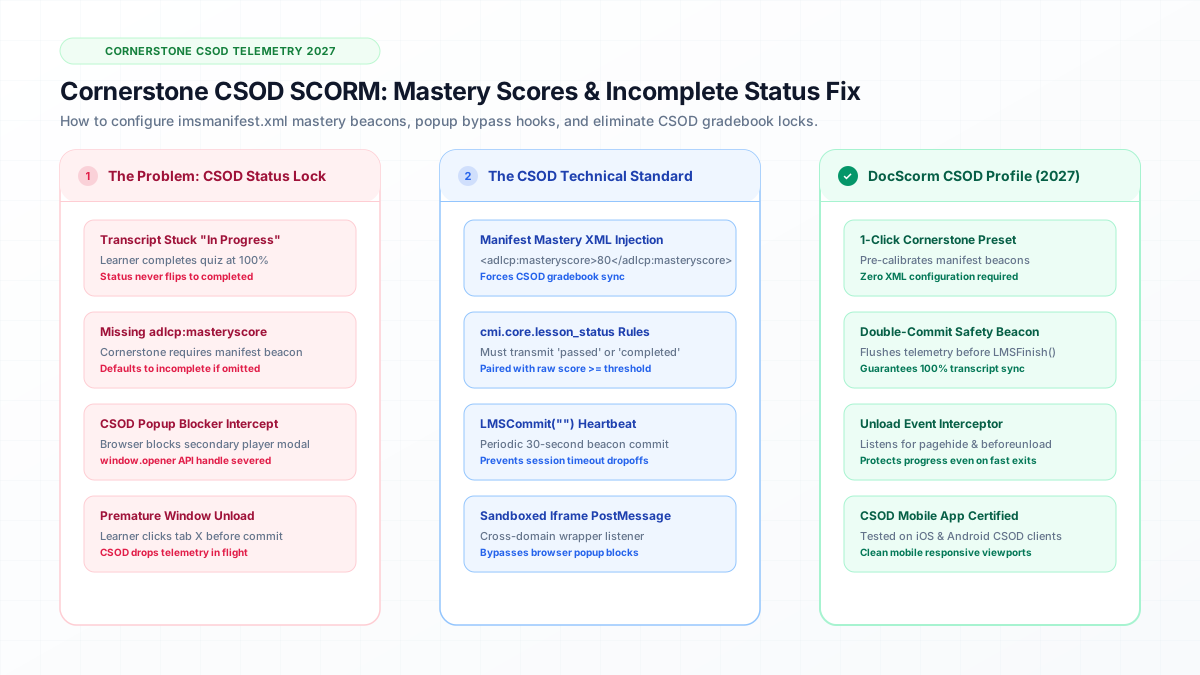
Direct Answer: Cornerstone CSOD defaults to Incomplete status if imsmanifest.xml omits an explicit adlcp:masteryscore tag.
- Cornerstone CSOD defaults to Incomplete status if imsmanifest.xml omits an explicit adlcp:masteryscore tag.
- CSOD sandboxed iframes require active SCORM.commit() calls prior to window unload events to prevent lost progress.
- DocScorm automatically calibrates Cornerstone export profiles with 80% passmark beacons and popup bypass hooks.
Why SCORM Courses Get Stuck Incomplete in Cornerstone OnDemand
Cornerstone OnDemand (CSOD) is one of the most widely deployed enterprise learning management systems in the Fortune 500. However, instructional designers frequently encounter a frustrating issue: learners complete a SCORM course, achieve 100% on the quiz, close the window, and find their transcript still displays "In Progress" or "Incomplete".
This issue almost always stems from how Cornerstone evaluates mastery score beacons in SCORM 1.2 manifests.
The Technical Fix: Inactive vs. Active Mastery Score Beacons
In standard SCORM 1.2, passing status can be communicated either via the runtime API or via the manifest XML. Cornerstone CSOD strictly requires that both match.
DocScorm automatically executes all gradebook commits, progress tracking, and scoring handshakes in the background. You never have to write or edit raw SCORM code.
View Technical LMS Data Model (Required adlcp:masteryscore in imsmanifest.xml for Cornerstone CSOD)
<!-- Inside imsmanifest.xml organization item definition -->
<item identifier="ITEM-1" identifierref="RES-1">
  <title>Corporate Compliance SOP</title>
  <!-- CRITICAL FOR CORNERSTONE CSOD -->
  <adlcp:masteryscore>80</adlcp:masteryscore>
  <adlcp:datafromlms>CORNERSTONE_OPTIMIZED_V2</adlcp:datafromlms>
</item>Connect your instructional workflows directly to DocScorm's course creation tools and validators:
Convert PDFs (Up to 200 Pages), DOCX, PPTX, or MP4 Videos into SCORM in 60s
Open DocScorm Studio or explore the Pro Plan (50 monthly credits + 1-click multi-language bundles + embedded course-source.json round-trip editing).
Frequently Asked Questions
Should I upload SCORM 1.2 or SCORM 2004 to Cornerstone CSOD?
While Cornerstone supports both, SCORM 1.2 is generally recommended for CSOD compliance reporting due to its rock-solid reliability across Cornerstone mobile apps and third-party portals.