How to Convert PDF to SCORM for Canvas LMS: A Step-by-Step SpeedGrader Guide
Direct step-by-step technical guide for instructional designers and faculty converting course PDFs into SCORM 1.2/2004 packages with Canvas SpeedGrader score sync and ADA Title II compliance.
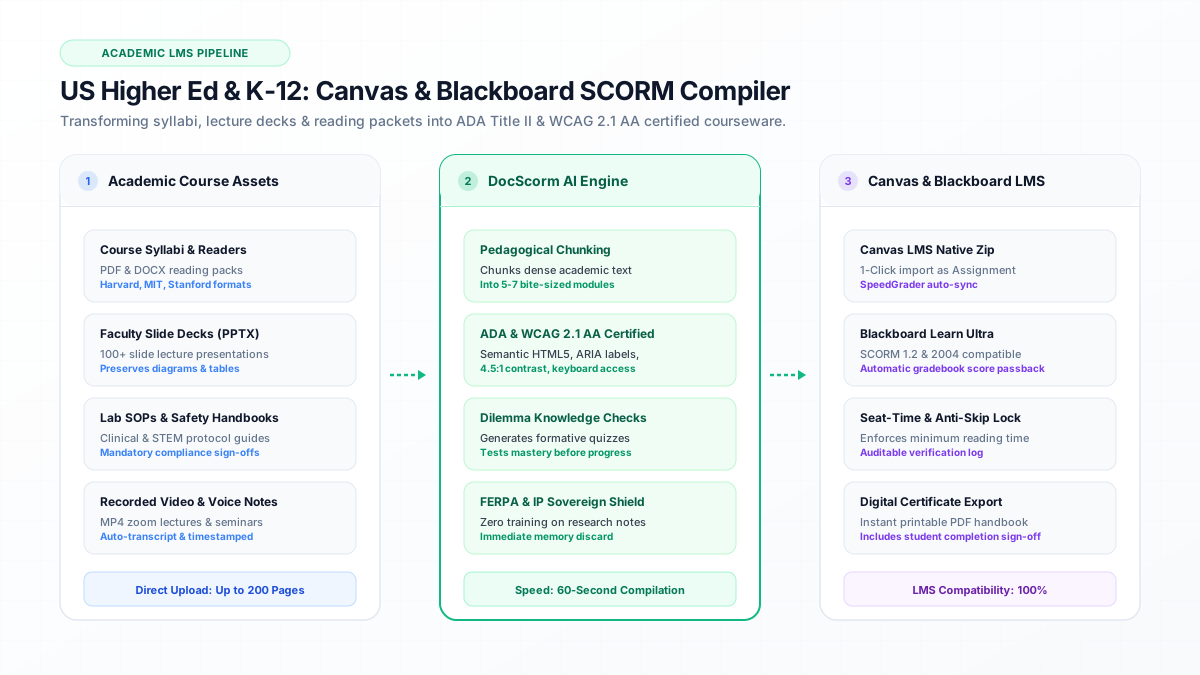
Direct Answer: To convert a PDF for Canvas LMS, chunk dense text into 5-7 interactive slides and compile as a standard SCORM 1.2 ZIP package.
- To convert a PDF for Canvas LMS, chunk dense text into 5-7 interactive slides and compile as a standard SCORM 1.2 ZIP package.
- Canvas requires the SCORM LTI tool activated in Course Settings > Apps before uploading packages.
- Selecting "Graded Assignment" during package import connects cmi.core.score.raw directly to the Canvas Gradebook and SpeedGrader.
- DocScorm automatically embeds WCAG 2.1 AA semantic markup satisfying the 2026 DOJ ADA Title II digital accessibility mandate.
Direct Answer: How to Convert PDF to SCORM for Canvas LMS in 60 Seconds
To convert a PDF into a Canvas LMS-ready SCORM 1.2 package, upload the PDF document to DocScorm, select your desired module chunk size (5–7 slides), enable ADA Title II WCAG 2.1 AA accessibility compliance, and download the compiled ZIP file.
In Canvas, navigate to Course Settings > Apps, ensure the SCORM tool is active, upload the ZIP archive via the SCORM tab, and set the assignment display to "Graded Assignment". This enables automatic SpeedGrader score passback via cmi.core.score.raw upon quiz completion.
- Step 1: Upload syllabus, lecture notes, or course reader PDF to DocScorm.
- Step 2: Choose SCORM 1.2 (recommended for Canvas) and set mastery score threshold (e.g. 80%).
- Step 3: Download the compiled course ZIP archive.
- Step 4: In Canvas Course Navigation, click SCORM > Upload, select the ZIP, and choose "Graded Assignment".
- Step 5: Publish the assignment and verify real-time score logging in SpeedGrader.
Canvas LMS Gradebook Telemetry & CMI Handshake
Canvas LMS communicates with SCORM packages via an iframe wrapper that exposes window.API (for SCORM 1.2) or window.API_1484_11 (for SCORM 2004). When a student completes an interactive module, the package must execute an explicit LMSCommit("") call to persist the grade in the Canvas database.
DocScorm automatically executes all gradebook commits, progress tracking, and scoring handshakes in the background. You never have to write or edit raw SCORM code.
View Technical LMS Data Model (Canvas SpeedGrader CMI JavaScript Handshake)
// Initialize CMI connection in Canvas iframe
const lms = window.API || (window.parent && window.parent.API);
if (lms) {
  lms.LMSInitialize("");
  // Set student progress
  lms.LMSSetValue("cmi.core.lesson_status", "incomplete");
  lms.LMSSetValue("cmi.core.session_time", "00:04:15");

  // On quiz completion: submit raw score to Canvas Gradebook
  lms.LMSSetValue("cmi.core.score.raw", "92");
  lms.LMSSetValue("cmi.core.score.min", "0");
  lms.LMSSetValue("cmi.core.score.max", "100");
  lms.LMSSetValue("cmi.core.lesson_status", "passed");

  // Explicit commit required for SpeedGrader instant sync
  lms.LMSCommit("");
  lms.LMSFinish("");
}Manual Storyline Authoring vs. DocScorm Automated Compiler
Traditional course design methods force professors and instructional designers to manually copy and paste paragraphs into Articulate Storyline or Adobe Captivate, creating bottlenecks during semester preparation.
| Metric | Manual Articulate Workflow | DocScorm Compiler |
|---|---|---|
| Authoring Time | 25 - 40 hours per module | 60 seconds automated |
| Software Cost | $1,399 / user / year | Included in institutional plan |
| Canvas SpeedGrader Sync | Manual trigger configuration | Native zero-config sync |
| ADA Title II Compliance | Manual ARIA tagging & contrast audits | Pre-certified WCAG 2.1 AA |
| Audio Narration | Manual recording or separate AI TTS | Built-in multi-voice synthesizer |
Connect your instructional workflows directly to DocScorm's course creation tools and validators:
Convert PDFs (Up to 200 Pages), DOCX, PPTX, or MP4 Videos into SCORM in 60s
Open DocScorm Studio or explore the Pro Plan (50 monthly credits + 1-click multi-language bundles + embedded course-source.json round-trip editing).
Frequently Asked Questions
Why does my SCORM score not show up in Canvas SpeedGrader?
In 95% of cases, SCORM scores fail to appear in Canvas SpeedGrader because the upload was configured as an "Ungraded Practice" rather than a "Graded Assignment", or the authoring tool omitted the LMSCommit("") function call after writing cmi.core.score.raw.
Does Canvas LMS support SCORM 2004?
While Canvas supports SCORM 2004 4th Edition, Instructure officially recommends SCORM 1.2 for the most reliable grade passback across mobile web and the Canvas Student app.