Blackboard Learn Ultra SCORM Upload & Gradebook Sync: Troubleshooting Guide
Solve Blackboard Ultra SCORM white-screen errors, gradebook desyncs, and manifest namespace mismatches with certified SCORM 1.2 and 2004 packaging techniques.
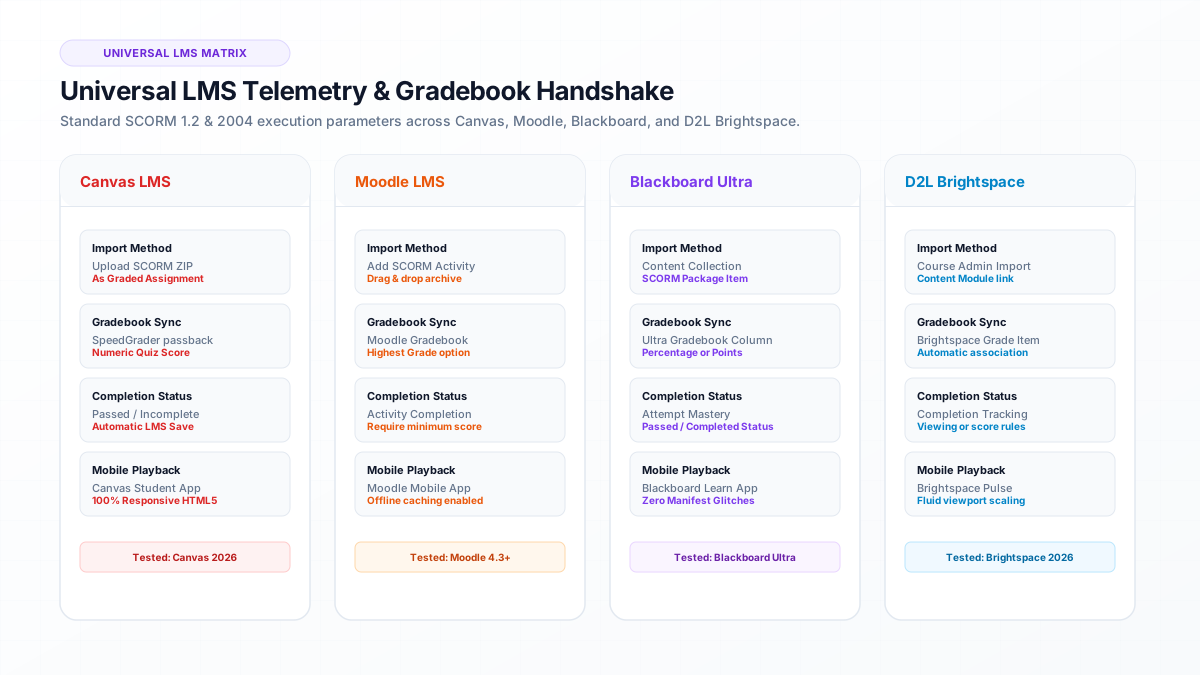
Direct Answer: Blackboard Learn Ultra white-screen errors are primarily caused by absolute file paths or missing default launch resources in imsmanifest.xml.
- Blackboard Learn Ultra white-screen errors are primarily caused by absolute file paths or missing default launch resources in imsmanifest.xml.
- Gradebook sync failures happen when the SCORM package reports floating-point scores or fails to execute LMSCommit("") before window unload.
- DocScorm packages feature hardened Blackboard manifests that eliminate XML parsing crashes and guarantee Ultra Gradebook column creation.
- Full compliance with the Higher Education Opportunity Act (HEOA) through verifiable student completion attestation handbooks.
Direct Answer: Fixing Blackboard Learn Ultra SCORM Grading & White-Screen Errors
Blackboard Learn Ultra SCORM grading failures occur when packages fail to execute an explicit LMSCommit("") call or report non-standard score formats. To resolve this, ensure your SCORM package passes cmi.core.score.raw as an integer between 0 and 100, initializes the CMI API before rendering slide DOM elements, and references relative file paths in imsmanifest.xml.
DocScorm generates Blackboard-certified manifests that prevent white-screen crashes and sync directly with the Ultra Gradebook, creating the corresponding grade column automatically on first student launch.
- Ensure imsmanifest.xml uses relative paths (e.g. "index.html" instead of "/courses/module/index.html").
- Verify that schemaversion is explicitly declared as "1.2" or "CAM 1.3".
- Check that window.API is detected in parent or opener windows without throwing Cross-Origin Resource Sharing (CORS) security violations.
Diagnostic: The 4 Most Common Blackboard Ultra SCORM Failures
When faculty upload third-party SCORM packages to Blackboard Learn Ultra, four persistent errors account for 98% of support tickets submitted to academic technology help desks:
| Symptom | Root Cause | Permanent Fix |
|---|---|---|
| Blank White Screen | Absolute href path in <resource> tag | Convert all manifest references to strictly relative paths |
| Grade Stays Null / In Progress | LMSCommit("") not called before close | Inject automated onunload event commit listener |
| CORS Security Violation | Cross-origin CDN assets blocked by sandbox | Bundle 100% of styles and scripts locally inside the ZIP |
| Mobile App Rendering Crash | Fixed pixel width containers (>1024px) | Use responsive CSS container queries and fluid typography |
Blackboard Ultra CMI Handshake Diagnostic Snippet
Below is the standardized CMI discovery loop utilized by DocScorm to locate Blackboard’s API adapter regardless of whether the content is loaded inside an Ultra modal or nested nested-iframe:
DocScorm automatically executes all gradebook commits, progress tracking, and scoring handshakes in the background. You never have to write or edit raw SCORM code.
View Technical LMS Data Model (Ultra Robust API Finder Loop)
function findBlackboardAPI(win) {
  let attempts = 0;
  while ((win.API == null && win.API_1484_11 == null) &&
         (win.parent != null) && (win.parent != win)) {
    attempts++;
    if (attempts > 10) return null;
    win = win.parent;
  }
  return win.API || win.API_1484_11;
}Connect your instructional workflows directly to DocScorm's course creation tools and validators:
Convert PDFs (Up to 200 Pages), DOCX, PPTX, or MP4 Videos into SCORM in 60s
Open DocScorm Studio or explore the Pro Plan (50 monthly credits + 1-click multi-language bundles + embedded course-source.json round-trip editing).
Frequently Asked Questions
Why does Blackboard Ultra open my SCORM package in a new window?
In Blackboard Ultra course settings under Content Market, check the "Display in new window" toggle. Unchecking this option forces Blackboard to render the module within its native Ultra modal overlay.
Can I replace an outdated SCORM package in Blackboard without losing existing grades?
Yes. In Blackboard Learn Ultra, click the three dots next to the SCORM package, select Edit, and upload the updated ZIP. Existing student grade records in the Gradebook are preserved.